

A content syndication campaign may deliver leads that meet your targeting criteria, yet those records can still become difficult to use once they enter your CRM. A missing campaign ID, incorrect field mapping, or duplicate contact can disrupt attribution and sales follow-up. These problems are easier to prevent when the provider and marketing operations team agree on the delivery process before the campaign begins.
Content syndication CRM integration connects lead delivery with your systems for validation, assignment, and reporting. When configured correctly, it reduces manual processing, protects data quality, and helps marketing teams understand what happens after a lead is generated.
This guide covers integration methods, CRM configuration, lead validation, error handling, and the metrics needed to manage a reliable lead-delivery workflow.
Why CRM Integration Matters for Content Syndication
A lead that arrives late, loses its campaign source, or remains unassigned can create unnecessary work for marketing and revenue teams. Manual imports and inconsistent records also make campaign results harder to evaluate.
A reliable content syndication CRM integration helps teams:
- Reduce manual work: Automate repetitive lead transfers and imports.
- Preserve attribution: Retain campaign, publisher, and content details.
- Improve data quality: Check records against agreed eligibility criteria.
- Enable timely follow-up: Route leads to the appropriate owner.
- Measure downstream results: Connect lead delivery with sales acceptance and opportunity creation.
Integration should therefore be planned before a content syndication campaign launches, not added after delivery problems appear.
The practical question is not simply whether a provider can send leads into your CRM. It is whether those records arrive with the information your team needs to evaluate, assign, and act on them.
What Is Content Syndication CRM Integration?
Content syndication CRM integration is the process of transferring lead records from a syndication provider into a customer relationship management (CRM) system while preserving the information needed for qualification and follow-up.
The workflow typically includes four stages:
- Capture: A prospect engages with content and submits their information.
- Transfer: The provider sends the record through an agreed delivery method.
- Process: The receiving system validates fields, checks duplicates, and applies assignment rules.
- Follow up: Eligible leads reach the appropriate team and enter reporting workflows.
Validation and duplicate checks may take place before the CRM, within the CRM, or in a connected integration platform. The exact process depends on the systems involved.
It is also important to distinguish technical processing from lead acceptance.
A CRM may successfully create or update a contact even when the record fails the campaign’s targeting or qualification requirements. Likewise, a valid existing contact may be processed correctly but excluded from billing under the agreed duplicate policy.
The CRM’s processing result and the provider’s contractual lead acceptance result should therefore be tracked separately.
Ways to Integrate Syndication Leads: APIs, Webhooks, CSV and Secure Transfers
The right delivery method depends on lead volume, required speed, technical resources, and security requirements.
| Delivery method | How it works | Best suited for | Main consideration |
|---|---|---|---|
| API | Systems exchange records through defined endpoints | Recurring automated delivery | Authentication, field validation, error handling, and API limits |
| Webhook | An event triggers a notification or data transfer | Event-driven delivery where supported | Receiving endpoint reliability and retry behavior |
| CSV import | Leads arrive in structured files and are imported manually or automatically | Smaller campaigns and batch delivery | Consistent column formats and import checks |
| Secure file transfer | Lead files move through an agreed secure channel, such as SFTP | Scheduled batch delivery | Access controls, file processing, and reconciliation |
An API can send leads to a CRM directly or through an integration platform. It reduces repetitive imports but requires secure access, correctly mapped fields, and a way to handle errors.
A webhook is commonly used to notify a receiving system when an event occurs. The receiving system may then process the supplied information or request additional data through an API.
CSV describes the file format, while secure file transfer describes how a file moves between systems. A provider may therefore deliver CSV files through SFTP.
When comparing API vs CSV lead delivery, consider how frequently leads arrive, how quickly they need processing, security requirements, and how easily your team can investigate failed records.
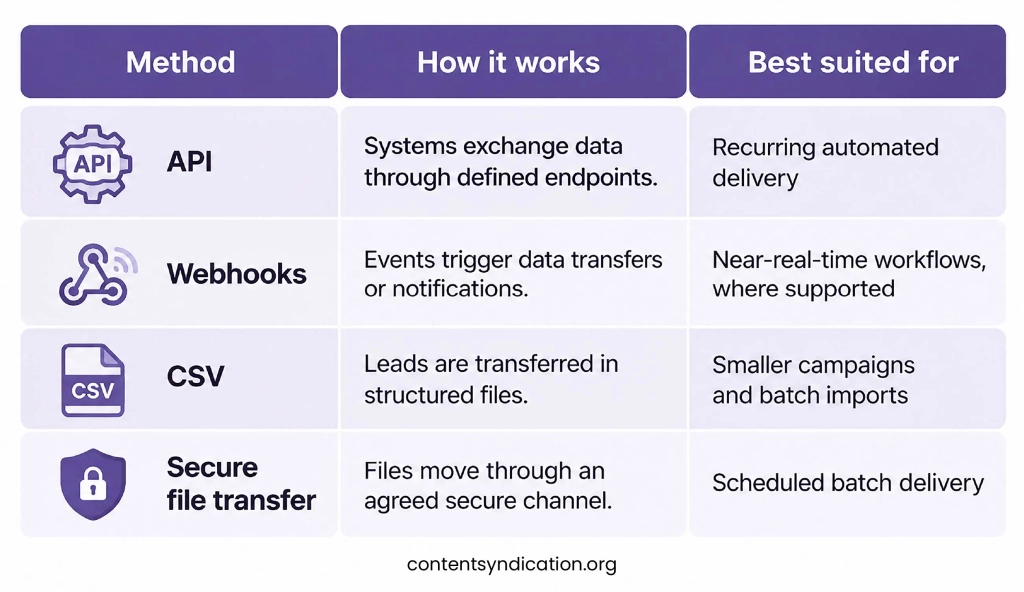
For a small pilot campaign, a controlled CSV workflow may be sufficient. For recurring campaigns across several providers, an automated integration may reduce operational effort, provided the necessary monitoring and recovery processes are in place.
Neither method is automatically better. A poorly monitored API connection can cause more reporting problems than a carefully managed batch import.
Prepare CRM Fields, Campaign IDs and Source Attribution
Before connecting systems, define the information every lead must contain and where each value should be stored.
Common fields include:
- Name, business email, company, and job title
- Country, region, or target-account details
- Campaign ID and publisher name
- Content asset and delivery date
- Relevant consent or permission information
Create a CRM lead field mapping specification that documents the source field, destination field, expected format, and validation rule. Separate mandatory fields from optional enrichment data.
For example:
| Provider field | CRM destination | Validation requirement |
|---|---|---|
| business_email | Required; valid email format | |
| company_name | Company | Required when specified by campaign criteria |
| job_title | Job Title | Check against agreed job-function targeting |
| campaign_id | Campaign ID or campaign association | Must match an approved campaign |
| publisher_source | Lead Source Detail or equivalent | Retain the supplied source information |
| delivery_timestamp | Delivery Date/Time | Valid timestamp with a defined time zone |
| consent_timestamp | Consent Timestamp or evidence record | Validate where required by policy |
These are example mappings, not universal Salesforce or HubSpot field names. Custom properties or objects may need to be configured.
Use stable campaign IDs to connect provider records with CRM reporting. Preserve the original acquisition source when updating existing contacts, and record new campaign interactions separately where possible.
For instance, a contact might download one white paper in March and another in June. That does not necessarily mean the CRM should create a second contact. The June interaction can be associated with the existing record while preserving its original source and the new campaign touchpoint.
Before accepting live deliveries, test the mappings with sample records that include missing values, existing contacts, invalid campaign IDs, and different timestamp formats.
Step-by-Step: Validate, Import and Assign Syndication Leads
A consistent process makes content syndication CRM integration easier to maintain across providers and campaigns.
Step 1: Confirm delivery and acceptance requirements
Before launch, agree with the syndication provider on mandatory fields, campaign identifiers, delivery frequency, authentication, audience exclusions, and lead acceptance criteria.
Document who investigates failed records, how corrections will be handled, and whether invalid or duplicate deliveries qualify for replacement under the campaign agreement.
Confirm how individual deliveries will be identified and reconciled. This is particularly important when records may be resent after an error.
Step 2: Test sample records
Check field formats, campaign IDs, timestamps, and existing contacts before processing live leads.
Test valid records as well as records with missing fields, incorrect formats, or previously delivered email addresses.
Step 3: Apply lead validation
Verify that records meet campaign requirements, including relevant geography, business email criteria, target audience fit, and required permission information.
Apply the agreed suppression and opt-out checks. A record should not proceed to outreach simply because it has valid contact fields.
Distinguish technical validation failures from business qualification decisions. A technically valid record may still fall outside the agreed target audience.
Step 4: Process the transfer
Import the batch or run the automated connection. Review rejected records and retain error details for investigation.
For automated API workflows, record an appropriate delivery identifier so repeated attempts can be recognized rather than creating duplicate entries.
Step 5: Assign ownership
Route eligible leads to the correct owner, queue, or nurture workflow.
An existing account may already have a named owner. In that case, account ownership rules may take priority over general territory assignment.
Step 6: Reconcile results
Compare provider-submitted records with those successfully processed, rejected, held for review, and affected by technical errors.
Every submitted record should have an identifiable outcome, including records that are still pending.
Example: Reconciling 200 Content Syndication Lead Records
Consider an illustrative enterprise software campaign in which a provider submits 200 lead records.
After processing, the CRM reconciliation report shows:
| Processing outcome | Records |
|---|---|
| Successfully created or correctly updated in the CRM | 170 |
| Rejected due to mandatory validation failures | 15 |
| Held for manual review | 10 |
| Unprocessed due to technical errors | 5 |
| Total submitted records | 200 |
All 200 records are accounted for, but only 170 have been processed successfully.
The 10 records awaiting review and five technical failures require follow-up. The 15 validation failures should be reviewed against the agreed acceptance and replacement criteria.
Existing contacts among the 170 successful records should be updated or associated with new campaign activity according to the agreed deduplication rules.
Whether those records qualify for billing or replacement is a separate decision based on the campaign agreement.
This example illustrates why teams should reconcile every submitted record rather than rely only on the number of new CRM contacts.
Who Owns Each Part of the Integration?
Clear ownership prevents technical problems from becoming unresolved campaign disputes.
| Responsibility | Typical owner | Key task |
|---|---|---|
| Lead capture and source-data corrections | Content syndication provider | Supply agreed fields and investigate source-record issues |
| Field mapping and data validation | Marketing Operations / RevOps | Maintain mapping specifications and validation requirements |
| API authentication and transfer errors | Integration or CRM administrator | Monitor connections, logs, retries, and failed requests |
| CRM deduplication and routing | CRM administrator / Sales Operations | Maintain matching, account ownership, and assignment rules |
| Campaign acceptance and replacement decisions | Demand Generation / Marketing Operations | Reconcile delivered leads against the campaign agreement |
| Sales acceptance and disposition | Sales Operations / Sales team | Apply agreed acceptance criteria and record outcomes |
These are suggested responsibilities. Actual ownership will depend on the organization’s systems and team structure.
Planning a content syndication campaign? Ask prospective providers for a sample lead-delivery specification before committing to the campaign. Confirm which fields they supply, how they handle suppression lists and duplicates, and whether their reporting supports your CRM’s acceptance requirements.
Set Up Deduplication and Lead Routing Rules
Duplicate records can distort reporting and create unnecessary outreach. CRM lead deduplication should use reliable matching criteria, such as business email, with additional checks where needed.
Define how the system should handle a match. It may update permitted fields, attach the new campaign activity to an existing record, or flag uncertain cases for review.
Avoid overwriting original acquisition information.
CRM Deduplication vs. Campaign Suppression
CRM deduplication and campaign suppression solve different problems.
Deduplication determines whether a submitted lead matches an existing CRM record and how that information should be stored.
Campaign suppression determines whether a person or account should be excluded from a campaign or from further outreach based on agreed business rules.
For example:
- A contact already in the CRM may be eligible for a new content interaction without requiring another contact record.
- An existing customer may be excluded from a net-new acquisition campaign.
- An account with an active sales opportunity may be suppressed to avoid conflicting outreach.
- An opted-out contact must be handled according to applicable communication restrictions, regardless of whether the record is new or existing.
A successful CRM match does not establish campaign eligibility.
Marketing operations teams should document suppression criteria before launch and clarify how matches are reported, reviewed, and treated for contractual acceptance.
Salesforce Duplicate Handling
Salesforce provides matching rules and duplicate rules that can identify potential duplicate leads and contacts. Their behavior depends on the organization’s configuration.
For API integrations, Salesforce also supports creating or updating records through an external-ID-based upsert operation.
An upsert uses the specified external ID to determine whether a record should be created or updated. It does not replace a broader deduplication policy across leads, contacts, and accounts.
See the Salesforce REST API documentation for implementation details.
HubSpot Duplicate Handling
HubSpot commonly uses email addresses to identify existing contacts during imports. Depending on the import configuration, matching records can be updated rather than duplicated.
However, not all HubSpot objects and integration methods use identical matching behavior. For example, company records created through the API are not automatically deduplicated by company domain name.
Check the relevant identifier rules before importing or synchronizing records.
See HubSpot’s deduplication documentation for the current behavior.
Configure Lead Routing Automation
Next, configure lead routing automation using criteria such as territory, industry, account ownership, or campaign type.
Include a fallback queue for records that do not meet any defined rule.
Test exceptions as well as standard scenarios. Missing location data or an unavailable account owner should not leave an otherwise valid lead without an assigned destination.
Record when the lead was assigned and whether that assignment succeeded.
Troubleshoot Mapping Errors, Failed Transfers and Missing Data
Common integration problems include incompatible fields, missing values, failed transfers, duplicate records, and incorrect attribution.
| Problem | What to check | Recommended response |
|---|---|---|
| Import failures | Error logs and required-field rules | Correct invalid values and retry eligible records |
| Incorrect field values | Source and destination mappings | Review expected formats and transformation logic |
| Missing leads | Provider totals and receiving-system logs | Reconcile submitted records against processing outcomes |
| Duplicate records | Matching criteria and repeat delivery attempts | Review identifiers and duplicate-handling rules |
| Unassigned leads | Routing criteria, territory rules, and fallback queues | Fix assignment logic and reprocess affected records |
| Missing attribution | Campaign IDs and source fields | Verify mappings before the next delivery |
| API authentication errors | Credentials, permissions, and token expiry | Restore authorized access and repeat failed requests safely |
![Common CRM Integration Problems and Recommended Responses]](https://contentsyndication.org/wp-content/uploads/2026/11/How-to-Troubleshoot-Problems-1024x684.webp)
For automated connections, check authentication expiry, API rate limits, timeouts, and retry behavior.
Retries should not create duplicate records when a transfer succeeded but its confirmation was lost. Use unique delivery identifiers and a documented retry process where the integration architecture allows it.
Assign responsibility for each failure type. Providers may own source-data corrections, while marketing operations and CRM administrators manage campaign requirements and destination rules.
Not every rejected record represents a provider-quality problem. Some failures originate from internal mappings, missing CRM properties, or routing rules.
Monitor Delivery Success, Processing Time and Sales Acceptance
A working connection does not guarantee that leads are being processed effectively.
Track technical processing, campaign eligibility, and sales acceptance separately.
| Metric | Calculation or measurement |
|---|---|
| Delivery processing success rate | Records successfully created or correctly updated in the CRM ÷ total records submitted for processing × 100 |
| Processing time | Time between provider submission and successful CRM availability |
| Validation failure rate | Records failing agreed validation rules ÷ records evaluated × 100 |
| Assignment success rate | Eligible processed leads successfully assigned ÷ eligible processed leads requiring assignment × 100 |
| Sales acceptance rate | Sales-accepted leads ÷ leads submitted for sales review × 100 |
| Reconciliation variance | Submitted records minus the total of accounted-for processing outcomes |
How to Calculate Delivery Processing Success
Delivery processing success rate = (Records successfully created or correctly updated in the CRM ÷ Total records submitted for processing) × 100
Using the earlier 200-record example:
- Total submitted records: 200
- Successfully created or correctly updated: 170
Delivery processing success rate = (170 ÷ 200) × 100 = 85%
This is a technical processing measure, not a lead-quality or campaign acceptance rate.
The 15 validation failures, 10 pending records, and five technical failures should be reported separately.
The reconciliation variance is zero because all 200 submitted records have a recorded outcome. That does not mean all 200 records have been successfully processed.
How to Calculate Sales Acceptance Rate
Sales acceptance rate = (Sales-accepted leads ÷ Leads submitted for sales review) × 100
Suppose 80 eligible leads are submitted to sales and 60 are accepted.
Sales acceptance rate = (60 ÷ 80) × 100 = 75%
These figures are illustrative, not industry benchmarks.
A technically successful record update should not automatically be counted as a newly acquired, sales-accepted, or contractually billable lead.
Review Results by Campaign and Provider
Review processing outcomes by campaign and provider at least as frequently as the delivery schedule requires.
Separate missing records, validation failures, duplicates, pending records, and sales rejections rather than combining them into one rejection figure.
If leads are reaching the CRM correctly but sales acceptance remains low, investigate audience criteria, account exclusions, and qualification rules before assuming the integration is responsible.
If valid leads repeatedly fail to reach their assigned owners, examine routing logic and assignment exceptions.
Where multiple systems are involved, monitor CRM data synchronization to identify inconsistent field values, campaign information, or record statuses.
To evaluate performance beyond technical delivery, connect these records with content syndication campaign performance reporting.
Frequently Asked Questions
1. How does Salesforce CRM integration for content syndication leads work?
A provider can transfer records through a supported API connection, integration platform, or structured import.
The receiving process maps fields, validates records, checks duplicates, assigns ownership, and retains campaign attribution.
Salesforce supports API-based record creation and updates, including external-ID upserts. The actual workflow depends on the organization’s fields, permissions, duplicate rules, and routing configuration.
2. How does HubSpot integration work for content syndication leads?
Content syndication leads can be imported into HubSpot using supported APIs, integration platforms, or structured files.
Map the provider’s fields to the appropriate HubSpot properties, identify how existing contacts will be matched, and configure the necessary ownership and follow-up rules.
For file-based imports, HubSpot supports contact identifiers such as email and record ID. Check property settings and test existing-contact scenarios before enabling regular delivery.
3. How do you integrate content syndication leads into a CRM without losing attribution?
Define source and campaign fields in advance, preserve original acquisition information, and test the complete path from provider submission to CRM reporting.
When an existing contact engages with another campaign, record the new interaction separately where supported rather than replacing historical source information.
4. How can you automate content syndication lead delivery?
Choose a supported API, webhook, or integration platform.
Configure field mappings, validation, duplicate handling, routing, error recovery, and monitoring before enabling automated transfers.
Test both successful deliveries and common exceptions, including missing fields and repeat submissions.
5. How should consent information be handled?
Agree with the provider on the permission information required for each record, including relevant consent language, collection details, and supporting evidence where applicable.
Store information needed to demonstrate permitted processing and honor applicable opt-out, suppression, and privacy requirements.
Different jurisdictions and outreach channels may impose different obligations, so review the process with the appropriate compliance team.
Review Your Content Syndication Lead-Delivery Workflow
Effective content syndication CRM integration depends on consistent field definitions, reliable transfers, clear ownership, and visibility into what happens after delivery.
Before launching a campaign, check whether your provider and internal teams agree on:
- Required CRM fields and campaign identifiers
- Lead delivery methods and schedules
- Duplicate handling and account suppression rules
- Validation, acceptance, and replacement criteria
- Responsibility for delivery errors and reporting
These requirements are easier to resolve before leads begin arriving.
Planning a B2B Content Syndication Campaign?
Before launch, make sure your targeting criteria, lead-delivery format, required CRM fields, and acceptance rules are clearly documented.
If you’re evaluating a content syndication partner, explore our B2B content syndication services and discuss the campaign requirements your marketing and sales operations teams need to agree on.